Caption Suite
Your captions.
Perfected.
Professional captions. Beautiful animations. One seamless workflow.
Create, customize and animate captions directly inside Premiere Pro, After Effects and DaVinci Resolve Studio.
Left: the panel, recorded in Premiere Pro. Right: its captions, rendered by After Effects. Real recordings, not mock-ups.
Inside Premiere Pro, After Effects and DaVinci Resolve
Everything happens inside your editing workflow.
Caption Suite is a panel in the apps you already edit in. Captions land on your timeline as real clips and layers, editable like everything else.
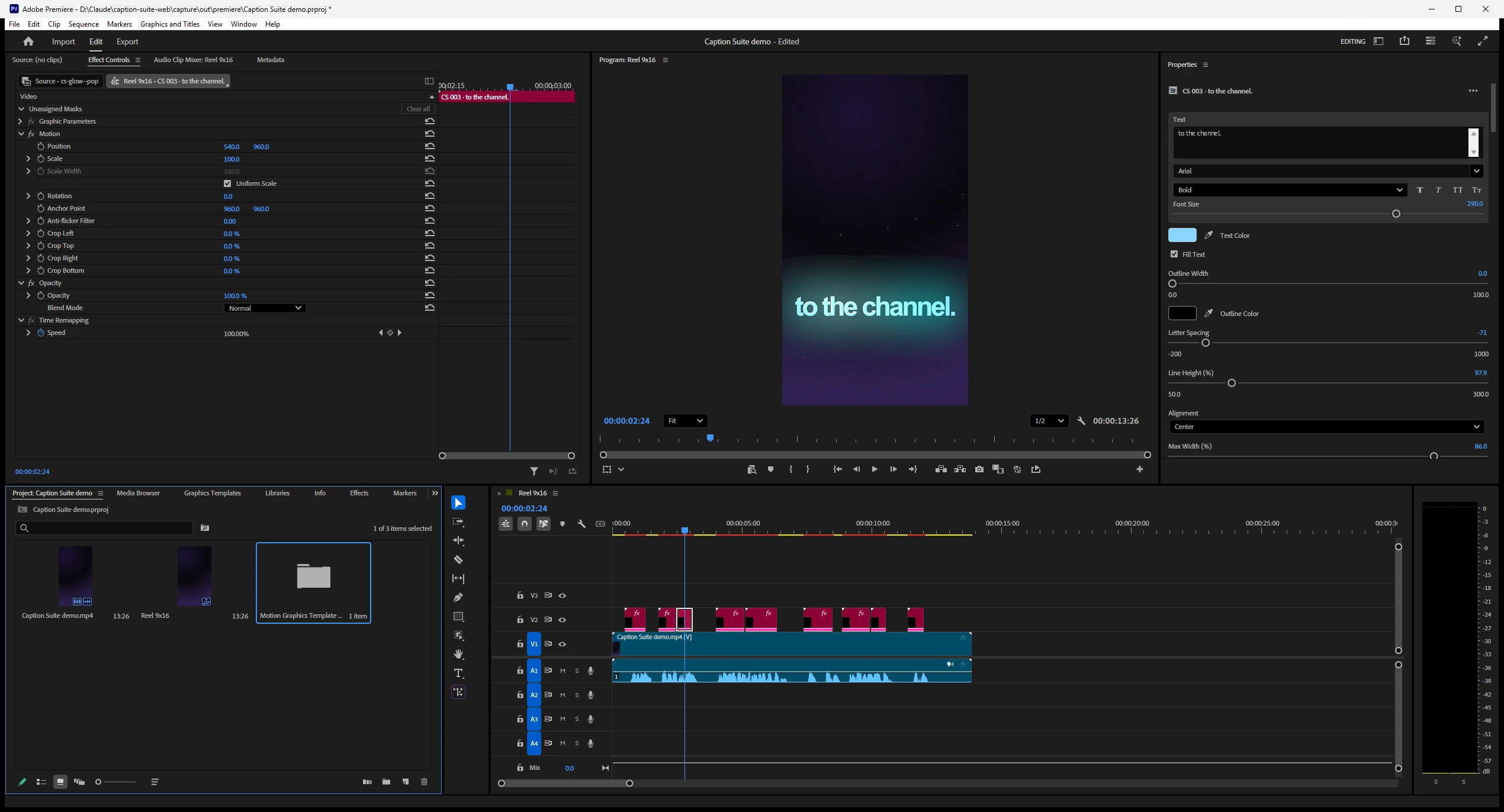
Screenshot of Adobe Premiere Pro 2026 after Caption Suite added captions.
Demo
See it work. Start to finish.
The real panel, recorded inside the Adobe apps. Choose a chapter, or let it play.
Recorded in After Effects
Transcription
From audio to captions. Effortlessly.
Choose the language or let Caption Suite detect it. It transcribes your sequence, then hands you captions timed to every word, ready to check.
Transcribe
Language, source and High Accuracy, then one button.
Fix text and timing
Correct a word and its timing stays. Split, join and nudge captions; overlaps are caught before you add them.
- 100
- languages, or Auto-detect from the first 30 seconds of audio
- Local
- Transcribed on your computer. No API key, no upload.
- Word‑level
- timing, so every animation follows the voice
- High Accuracy
- mode for accents, music and difficult audio
Animation presets
Make every word count.
Styles and animations from Caption Suite's library, re-timed to every caption automatically. Each example below was rendered from a real sequence.
Glow style · Pop animation · rendered in After Effects
Customization
Your style. Every detail.
Start from a preset, then make it yours. Every change previews on your own captions before anything touches the timeline.
Caption format, recorded in Premiere Pro
- Fonts
- Any installed font and face, with faux bold and italic.
- Colors
- Fill colour, plus the spoken-word highlight or karaoke colour.
- Highlights
- Key words picked automatically or by you, with their own font, size, colour and animation.
- Outlines
- Width and colour.
- Backgrounds
- A box behind the text: colour, padding, corner radius, opacity.
- Positioning
- Position, scale and the Safe Zone; adjust all captions or only the selected ones.
- Animation
- Entrance, highlight animation, timing and easing, and a Fade out at the end.
- Grouping
- How many words per caption, line breaks and stacking.
Still editable in Premiere Pro.
Each animated caption keeps its text, font, colours and outline as controls in Premiere's Properties panel.
Premiere Pro · After Effects · DaVinci Resolve
One workflow. Three editors.
The same panel, styles and animations in both Adobe apps, and the same steps in DaVinci Resolve Studio. One license activation covers them all on your computer.
Premiere Pro
Animated captions on their own track, each one editable in the Properties panel. Or a native caption track.

After Effects
Real text layers in your composition, named by caption, with their animators ready to keyframe.
DaVinci Resolve Studio 19.0.2 or newer: open Workspace › Workflow Integrations › Caption Suite. Captions arrive on a new track as Text+ titles you edit in the Inspector, or as a subtitle track.
Crops of real screenshots taken in Premiere Pro 2026 and After Effects 2026.
Spend less time on captions. More time creating.
Bring Caption Suite into your editing workflow.
Pricing
One price. Yours to keep.
A lifetime license for every supported app. Pay once.
Caption Suite Lifetime License
€49,00
One-time payment · taxes calculated at checkout
- Lifetime license, one-time payment
- No subscription
- Premiere Pro 2023 or newer
- After Effects 2023 or newer
- DaVinci Resolve Studio 19.0.2 or newer
- Local AI transcription in 100 languages
- All included styles and animations
- Active on up to 2 computers at a time
- Future updates are included according to the license terms
Secure checkout by Shopify. Your license key arrives by email right after payment. Requires Windows 10 or 11 (64-bit). macOS support is in development and will be announced separately. How your license arrives
Questions and answers.
Do I pay once?
Yes. One payment buys a lifetime license: no subscription and no renewal. Updates are included as the license terms describe.
How many computers can use it?
Two at a time. One activation covers every editor on that computer. Move the license yourself under Settings › License › Manage devices.
Does my audio leave my computer?
No. Transcription runs on your computer with the speech model installed with Caption Suite. The only thing that goes online is the license check: your key, a random device ID, the computer’s name and system version.
Which editors and versions?
After Effects 2023 or later, Premiere Pro 2023 or later, and DaVinci Resolve Studio 19.0.2 or later. The free version of Resolve can’t run Workflow Integration plugins.
How do I install it?
Download the installer from the download page and run it with your editors closed. It sets up After Effects, Premiere Pro and DaVinci Resolve Studio together, with the speech engine included.
Does it work offline?
Yes. Once activated, Caption Suite keeps working for 14 days without internet and checks the license again whenever it can.
How do I get my license?
Pay through Shopify Checkout. Your license key is emailed to the address you used at checkout, usually within a few minutes. How your license arrives
Which languages?
100 languages, detected automatically or chosen from the list. Serbian can be written in Latin or Cyrillic.
Is there a Mac version?
It is being tested. Your license covers Windows and macOS: when the Mac version is released, activate it with the same key.
I lost my license key.
Open Caption Suite and choose Restore license, or enter your purchase email on the activation help page. The key goes to the email you bought with.
More questions? support@caption-suite.com